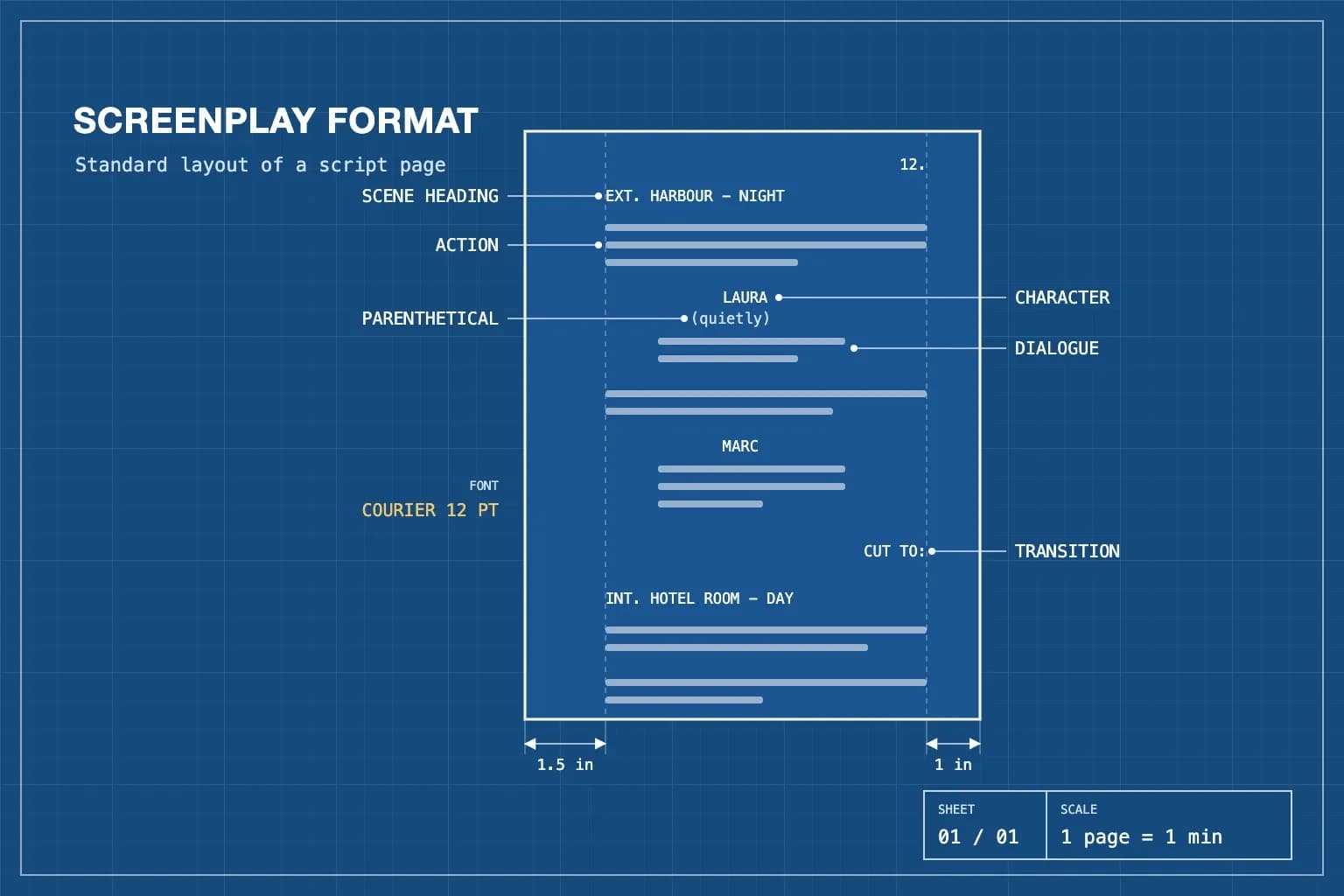
To use screenplay format in Word, set the page to US Letter, the font to 12-point Courier (or Courier New or Courier Prime), the margins to 1.5 inches on the left and 1 inch on the other three sides, and line spacing to exactly 12 points. Then create one paragraph style for each script element (scene heading, action, character, parenthetical, dialogue and transition) with the right indents, so a single shortcut puts every line in the correct place. Finally, export to PDF before anyone else sees the script.
You don't need dedicated screenwriting software to write a script that gets read. Readers see a PDF, not the program behind it. What Word lacks is automation: it doesn't know what a character cue is, and it won't stop a scene heading from stranding itself at the bottom of a page. This guide shows how to build that automation once and save it as a reusable template.
Why screenplay format in Word needs exact settings
Screenplay format exists so that pages are predictable. Because Courier is a fixed-width typewriter face, a correctly formatted page holds a consistent amount of material, which is why one page runs about one minute of screen time. If margins, font or spacing drift, a 100-page story can become 90 or 115 pages without a word changing. Our guide to how many pages a screenplay should be explains why readers pay attention to that number.
Word's defaults work against you here. A new document uses a proportional font, adds space after every paragraph, and in many countries starts on A4 paper. Every one of these can be fixed, once. For the bigger picture of why these details matter to readers, see why screenplay format matters.
Step 1: Page size, font and margins
Start with a blank document and set up the page before you type anything.
- Paper size: Layout > Size > Letter (8.5 × 11 inches). Use A4 only if a recipient asks for it.
- Margins: Layout > Margins > Custom Margins. Set Left to 1.5", Right to 1", Top to 1" and Bottom to 1". The wider left margin leaves room for the three-hole punch and brads that printed scripts are bound with.
- Font: 12-point Courier, Courier New or Courier Prime, a free font designed for screenplays. Use it for everything, including the title page. Our article on font selection in screenwriting explains why the industry still writes in a typewriter face.
The quickest way to apply the font everywhere is to change Word's built-in Normal style: on the Home tab, right-click Normal in the Styles gallery, choose Modify, and set the font and size.
Line spacing: the setting most people miss
In the same Modify Style dialog, open Format > Paragraph and set:
- Spacing Before and After: 0 pt.
- Line spacing: Exactly, at 12 pt.
Why not "Single"? Word's single spacing follows the font's own line height, which for Courier New is a little taller than 12 points, so pages hold fewer lines and the script looks longer. Exactly 12 pt gives the typewriter standard of six lines per inch.
Page numbers
Screenplay page numbers sit in the top right corner, followed by a period (for example "12."), with no number on the title page. In Word:
- Insert > Page Number > Top of Page, and choose the right-aligned plain number.
- Click after the number and type a period.
- In Layout > Margins > Custom Margins > Layout tab, set the header distance from the edge to 0.5".
- If the title page lives in the same file, put a Section Break (Next Page) after it, turn off "Link to Previous" in the header of the second section, and set Format Page Numbers > Start at 1. Then delete the number from the title page header.
Step 2: Create a style for every script element
This is what turns Word into a screenwriting tool. A paragraph style stores the indents, capitalization and spacing for one element, so you never press Tab to position text again; you just switch styles.
To create one, open the Styles pane on the Home tab, click New Style, name it, and base it on Normal so it inherits Courier and the 12-point spacing. Then open Format > Paragraph to set the indents. Indents in Word are measured from the page margin, not from the edge of the paper, so with a 1.5" left margin, an indent of 2.2" puts text 3.7" from the left edge of the page.
Working values for each element follow. Templates differ by a tenth of an inch here and there; consistency inside your script matters more.
- Scene heading: left indent 0", right indent 0", ALL CAPS, Spacing Before 24 pt. Bold is optional; many modern writers use it, many don't. See our guide to INT. and EXT. scene headings for what goes in the line itself.
- Action: left indent 0", right indent 0", sentence case, Spacing Before 12 pt. Keep paragraphs short; our guide to writing action lines covers how.
- Character: left indent 2.2" (about 3.7" from the page edge), right indent 0", ALL CAPS, Spacing Before 12 pt.
- Parenthetical: left indent about 1.6" (about 3.1" from the edge), right indent about 2.0", Spacing Before 0 pt.
- Dialogue: left indent 1.0" (2.5" from the edge), right indent 1.5", Spacing Before 0 pt. That gives a dialogue column about 3.5" wide.
- Transition: right-aligned, ALL CAPS, Spacing Before 12 pt. CUT TO: and DISSOLVE TO: end flush with the right margin.
To get capitals without typing them, tick All caps under Format > Font in the style dialog. You can type "kitchen" in a scene heading and it appears as KITCHEN.
Why Spacing Before instead of blank lines
Many writers press Enter twice to get a blank line between elements. In Word, let the styles create that space instead: a scene heading always gets its double gap, a character cue one blank line, and dialogue sits directly under the name. Empty paragraphs also cause trouble at page breaks, because they can land at the top of a page.
Chain the styles with "Style for following paragraph"
Each style has a setting called "Style for following paragraph". Set it so that pressing Enter moves you to the element that usually comes next:
- Scene heading → Action
- Action → Action
- Character → Dialogue
- Parenthetical → Dialogue
- Dialogue → Action (or Character, if your scripts are dialogue-heavy)
- Transition → Scene heading
Assign keyboard shortcuts
In the Modify Style dialog, Format > Shortcut key binds a style to a key combination, such as a modifier plus S for scene heading or D for dialogue. The dialog shows whether a combination is already assigned, so check before you overwrite a command you use.
Step 3: Fix the page-break problems Word doesn't know about
Screenwriting programs follow pagination rules automatically. In Word, you set them on the Line and Page Breaks tab of each style's Paragraph settings.
Keep with next
Turn on Keep with next for scene headings, character cues and parentheticals, so these lines always share a page with the paragraph after them and never sit alone at the bottom of a page. These are among the small errors that make a script look unfinished, along with the others in our list of common screenplay errors.
Keep lines together
Turn on Keep lines together for dialogue. Word will then move a whole speech to the next page rather than splitting it mid-sentence. For most speeches, this is all you need.
Handling (MORE) and (CONT'D)
When a long speech must break across pages, screenplay convention marks it: the bottom of the first page shows (MORE) under the dialogue, and the top of the next page repeats the character name followed by (CONT'D). Word can't do this for you. The manual method:
- Split the speech at the end of a sentence, never in the middle of one.
- At the bottom of the page, add a line with (MORE) in the Character style.
- At the top of the next page, type the character's name plus (CONT'D) in the Character style, then continue the dialogue.
Typed marks won't move if you edit earlier pages, so add them only once the draft is locked. If you need them often, your speeches may be too long anyway.
Step 4: Turn off the AutoCorrect features that fight you
Word's automatic formatting was built for letters and reports. Three features cause problems in a script:
- Automatic capitalization: AutoCorrect capitalizes the first letter after a period or at the start of a line, which can disrupt parentheticals like (quietly) and lowercase fragments. You'll find it in File > Options > Proofing > AutoCorrect Options (on a Mac, Word > Preferences > AutoCorrect).
- Automatic lists: typing "1." can turn a line into a numbered list. Turn this off under AutoFormat As You Type.
- Smart quotes and dashes: curly quotes are not wrong, but mixing curly and straight ones looks careless, especially after pasting text from elsewhere. Pick one style and stick to it.
Step 5: Save it as a template
Once the page setup and all six styles work, delete any sample text and save the file as a Word template (File > Save As, file type Word Template, .dotx). Every new script then starts ready. If you use more than one computer, install the same font on each, or Word will quietly substitute another.
Step 6: Export to PDF, never send the .docx
Producers, managers, contests and script readers expect a PDF. Sending the Word file looks inexperienced, and there are practical reasons too:
- Layout shifts. On a computer without your font or with different settings, pages reflow, page breaks move and your page count changes.
- Hidden information. A .docx can carry comments, tracked changes and your file properties. File > Info > Inspect Document cleans them.
- Editability. A Word file invites edits and looks like a draft.
Export with File > Save As (or Export) and choose PDF. Then open it and check it as a reader would: Courier throughout, page numbers in place, no stranded headings.
Check your page count
If a script runs unexpectedly short or long, check the line spacing (Exactly 12 pt), the paper size (Letter, not A4) and the margins first. A setup error of a few tenths of an inch can add or remove several pages. If you want an outside read of the script itself once the format is clean, you can upload your screenplay PDF to Poetika for a structured analysis of its structure, characters, pacing and market notes.
When to move beyond Word
Word works well for a first script or a short. Its limits show up in revisions and production: (MORE) and (CONT'D) are manual, and locked pages, scene numbers and colored revision pages are hard to reproduce. If you write regularly, programs such as Final Draft, Fade In, WriterDuet, Highland and Arc Studio apply every rule automatically. For a broader look at the options, see the modern screenwriter's desk; for the element-by-element rules themselves, see our complete guide to how to format a screenplay.
Screenplay format in Word checklist
- Paper size is Letter (or A4 only if requested)
- Margins: 1.5" left, 1" right, top and bottom
- 12-point Courier, Courier New or Courier Prime throughout
- Line spacing Exactly 12 pt, no automatic space after paragraphs
- Page numbers top right with a period, none on the title page
- Six styles with the correct indents, chained with "Style for following paragraph"
- Keep with next on scene headings, character cues and parentheticals
- Keep lines together on dialogue; (MORE) and (CONT'D) added last
- AutoCorrect capitalization and automatic lists turned off
- Exported to PDF and checked page by page
When the draft is done and the PDF is clean, get a structured read of your script with Poetika.
FAQ
Is Microsoft Word acceptable for writing a screenplay?
Yes. Readers, contests and producers see a PDF, not the program behind it, and a properly set-up Word document exports a PDF that looks like any other script. The trade-off is effort: you have to configure margins, styles and page breaks yourself and manage (MORE) and (CONT'D) by hand, which dedicated software does automatically.
What are the margins for screenplay format in Word?
Set the left margin to 1.5 inches and the right, top and bottom margins to 1 inch on US Letter paper. Element positions are then set with paragraph indents measured from the left margin: about 2.2 inches for character cues, 1.0 inch for dialogue, around 1.6 inches for parentheticals, and right alignment for transitions.
Should I use Courier New or Courier Prime in Word?
Either is accepted. Both are 12-point fixed-width fonts, so they keep the one-page-per-minute ratio. Courier Prime was designed specifically for screenplays and is a little heavier and easier to read on screen. Make sure the font is installed on every computer you use, and always share a PDF so the recipient sees your font.
Why is my Word screenplay longer than it should be?
The usual causes are line spacing set to Single instead of Exactly 12 pt, extra space after paragraphs from Word's default style, A4 paper instead of Letter, or margins wider than 1 inch. Each one reduces the number of lines per page. Fix them in the Normal style and in your page setup, then compare the page count again.
How do I add (MORE) and (CONT'D) in Word?
Word cannot add them automatically. When a speech must break across a page, split it at the end of a sentence, type (MORE) under the dialogue at the bottom of the page, and start the next page with the character name followed by (CONT'D). Do this only after your final edits, because typed marks don't move when pages reflow.